Cut the Dead Air.
Keep Every Great Take.

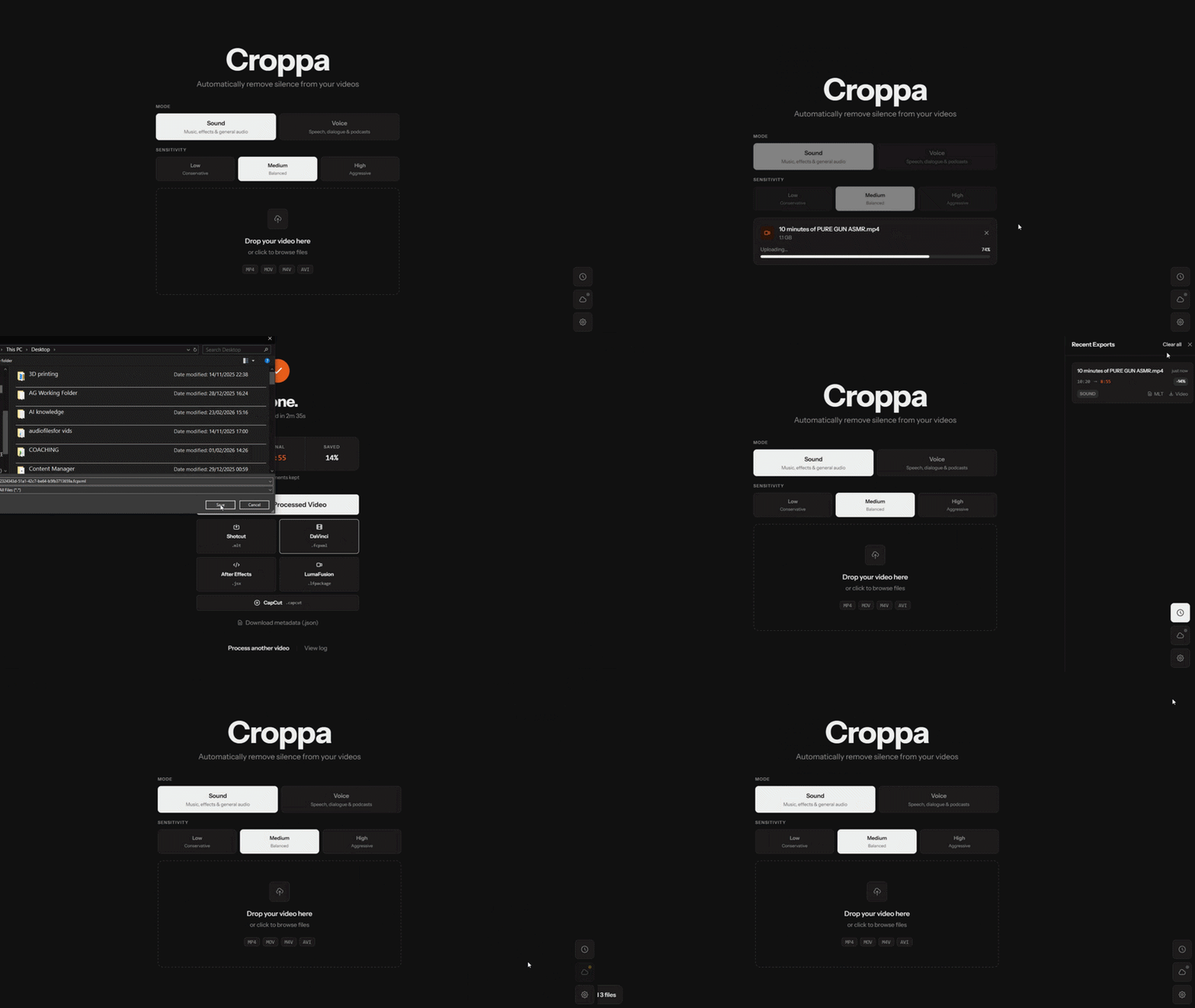
Croppa automatically detects and removes silent pauses from your videos — using local RMS energy detection, GPU-accelerated encoding, and zero cloud uploads. Drop your file. Get back a clean edit.

✓ Windows 10/11 ✓ 100% Local Processing ✓ Pay Once, Keep Forever

Built for YouTubers, podcasters, educators, and screencasters on Windows.

Croppa video editor interface — automatic silence detection and removal on Windows

Everything you need.
Nothing you don't.

✂️

Dead Air? Gone.

Croppa scans every millisecond of your audio using RMS energy detection. Pauses below your threshold get cut — automatically, in a single pass. No manual scrubbing. No listening through hours of footage.

🔒

Your Footage Never Leaves

Zero cloud uploads. Zero subscriptions. Croppa processes everything locally on your Windows PC — your raw footage stays on your drive, always.

GPU Fast-Lane

NVIDIA NVENC support means encoding finishes in a fraction of the time. Croppa falls back to CPU encoding automatically if no compatible GPU is detected — no config required.

H.264 · H.265 NVENC · x264 · x265 GPU auto-detect
🎬

Works With Your NLE

Export a finished MP4 or send the cut list straight to your editor: Final Cut Pro, Premiere Pro, DaVinci Resolve, LumaFusion, or Shotcut.

🎚️

Your Cut, Your Rules

Fine-tune the silence threshold (dB), minimum silence duration, and padding before and after speech. Two detection modes — Sound and Voice. No unwanted cuts, no missed pauses.

🌐

Edit From Anywhere

Start a Cloudflare tunnel with one click and access Croppa from your phone, tablet, or another machine — no router setup required.

From raw footage to clean edit
in three steps.

1

Drop your video

Drag and drop your video file — MP4, MOV, MKV, AVI, or any FFmpeg-supported format. Croppa loads it instantly. Windows may show a SmartScreen prompt on first install — click "More info" → "Run anyway". It's normal for independently-distributed apps.

2

Adjust your silence settings

Set the silence threshold (dB), minimum pause duration, and padding around speech. The defaults work great for talking-head videos and screencasts. Adjust for lectures, podcasts, or interviews.

3

Export your edit

Hit Process. Croppa renders a trimmed MP4 directly, or exports a ready-to-open timeline for your NLE of choice. Open it in Final Cut Pro, Premiere Pro, DaVinci Resolve, LumaFusion, or Shotcut — all cuts already in place.

Export to any editor.

Croppa speaks the native language of every major NLE. Choose your format and pick up exactly where Croppa left off — all cuts already done.

MP4

Direct Render

GPU or CPU-encoded H.264/H.265 — render-ready, upload instantly.

FCP

Final Cut Pro

FCPXML v1.9 — opens natively, no plugins needed.

DR

DaVinci Resolve

Import FCPXML via File → Import → Timeline.

Pr

Adobe Premiere Pro

AEJSX script recreates your cut sequence on import.

LF

LumaFusion

Native LumaFusion timeline export format.

SC

Shotcut

MLT XML — open directly in Shotcut, no conversion needed.

What creators are saying.

★★★★★5 out of 5 stars

"I record tutorial videos and the dead air between sentences was killing my edit time. Croppa cuts what used to be a 3-hour edit down to about 20 minutes. Export to Premiere works perfectly."

— James H., Software Tutorial Creator (48k subscribers)
★★★★★5 out of 5 stars

"Finally a Windows tool for this. I've been jealous of Recut on Mac for years. Croppa does everything I need — and the Final Cut Pro export is seamless. Well worth it."

— Priya M., YouTube Content Creator
★★★★★5 out of 5 stars

"I record university lectures and Croppa handles hour-long videos without a hiccup. The GPU acceleration is fast and the silence detection is incredibly accurate."

— Dr. C. Okafor, University Lecturer & Course Creator
★★★★★5 out of 5 stars

"We edit a weekly video podcast. Croppa halved our post-production time. The padding controls mean we don't get jarring jump cuts — it sounds completely natural."

— Tom & Sasha, Video Podcast Hosts
★★★★★5 out of 5 stars

"Running it offline means I can use it anywhere without worrying about privacy. My footage never leaves my machine. That alone sold me."

— Rachel T., Freelance Video Editor

Simple pricing. No surprises.

Croppa Free

£0
Download Free
  • Silence detection & preview
  • Direct MP4 export (up to 15 min)
  • All detection settings
  • Unlimited video length
  • NLE timeline exports (FCP, Premiere…)
  • GPU-accelerated encoding

Team / Studio

Custom
Contact Us
  • Everything in Pro
  • Multiple seats at a discount
  • Licence management & reassignment
  • Invoice billing available
  • Dedicated support

Secure checkout via Gumroad · Instant licence delivery · Windows 10 & 11

Why creators choose Croppa

Removing silence from videos manually is one of the most tedious tasks in post-production. Scrolling through a timeline, listening for pauses, placing cuts, trimming — it's slow, repetitive work. Croppa automates the entire process: it analyses your audio waveform using RMS energy detection, identifies silent segments, and cuts them out in a single automated pass. What used to take hours takes minutes.

Looking for the best automatic silence remover for Windows? Most alternatives have serious limitations. Descript is a cloud-based subscription that uploads your raw footage to external servers — a dealbreaker for anyone editing sensitive content. Recut is excellent but macOS-only. Manual silence detection in Adobe Premiere Pro or DaVinci Resolve is accurate but requires clicking through every detected pause individually. Croppa fills the gap: a native Windows desktop app that does everything locally, with no subscription and a one-time price.

Croppa is built for YouTubers editing talking-head videos, podcasters recording video episodes, educators making online courses, developers recording screencasts, and anyone who records themselves speaking and wants a tighter, faster-paced result. The RMS energy VAD is tuned for speech — adjustable threshold, minimum silence duration, and padding controls give you natural-sounding cuts without abrupt edges.

When you're ready to colour grade or add music, Croppa's FCPXML export opens directly in Final Cut Pro and DaVinci Resolve. The AEJSX script drops your cut timeline straight into Adobe Premiere Pro. LumaFusion and Shotcut are also supported. Or simply export a trimmed MP4 with GPU-accelerated H.264/H.265 encoding via NVIDIA NVENC — faster than any cloud service and completely private.

Got questions? Here are answers.

How does Croppa detect silence in my video?

Croppa uses RMS (Root Mean Square) energy-based Voice Activity Detection. It analyses the audio frame-by-frame and marks any region where the energy level falls below your configured threshold (in dB) for longer than the minimum silence duration you've set. You can also adjust padding — how much audio to keep before and after each speech segment — to ensure natural-sounding transitions.

Does Croppa upload my footage to the cloud?

No — never. Croppa runs entirely on your Windows PC. Your video files are processed locally and never transmitted anywhere. The only network request Croppa makes is a one-time licence verification against Gumroad when you first activate your key. Everything else is fully offline.

Which video formats does Croppa support?

Croppa accepts any format that FFmpeg supports as input — MP4 (H.264, H.265), MOV (ProRes, H.264), MKV, AVI, WebM, and more. If FFmpeg can read it, Croppa can process it. Output options include a rendered MP4, or a timeline export in FCPXML (Final Cut Pro / DaVinci Resolve), AEJSX (Premiere Pro), LumaFusion format, or MLT XML (Shotcut).

Can I export to Final Cut Pro, Premiere Pro, or DaVinci Resolve?

Yes. Croppa Pro exports FCPXML v1.9, which opens natively in Final Cut Pro and can be imported into DaVinci Resolve via File → Import → Timeline. For Adobe Premiere Pro and After Effects, Croppa exports an AEJSX script that automatically recreates your cut timeline. Shotcut users can import the MLT XML file directly, and LumaFusion is also supported.

Do I need an NVIDIA GPU?

No. An NVIDIA GPU with NVENC support gives you much faster H.264/H.265 encoding, but it's not required. Croppa detects your hardware automatically and falls back to high-quality CPU encoding (x264/x265) if no compatible GPU is found. Silence detection itself uses only the CPU and is fast regardless of GPU availability.

Why does Windows SmartScreen warn about the installer?

SmartScreen warns about installers from publishers that don't yet have a large distribution footprint. It doesn't mean the software is unsafe — it means Microsoft hasn't seen enough installs to build a reputation score yet. Click "More info" then "Run anyway" to proceed. Croppa accesses the internet only once (to verify your licence key) and never during normal use.

How does Croppa compare to Descript or Recut?

Descript is cloud-based and subscription-based — your footage gets uploaded to their servers and you pay monthly. Recut is excellent but macOS-only. Croppa is a native Windows desktop app: fully local, one-time payment, no subscriptions, and exports directly to every major NLE. If you're a Windows creator looking for a Recut or Descript alternative that keeps your footage private, Croppa is the answer.

Is it really a one-time payment?

Yes. Pay once, own Croppa Pro forever — including all future updates. No monthly fees, no annual renewals, no usage limits based on video length or number of exports. I hate subscription creep too.

Start editing faster today.

Join creators who've reclaimed hours every week. One payment. No cloud. No subscription.

Get Croppa Pro — £24.99 Download Free Trial